From Prototype to Production: The Gap Most Teams Fall Into
Reading time: 7 minutes
Last modified:
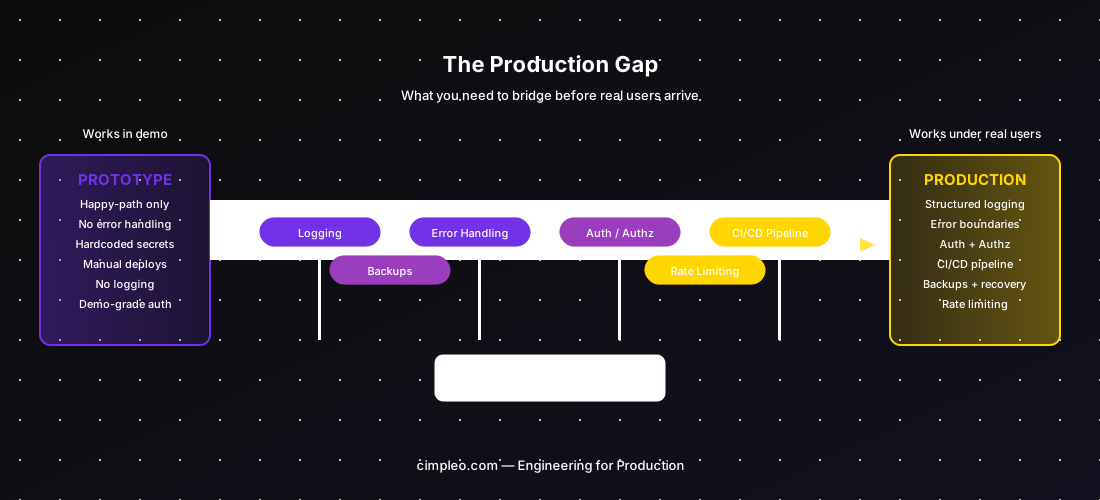
You’ve built a prototype. It works. Investors have seen it, stakeholders are excited, and the demo never crashed. The instinct now is to open it up to real users — after all, it’s mostly done, right?
It isn’t. The gap between a working prototype and a production system is the place where most early-stage products silently fail. Not on launch day, but in the weeks after, as small problems compound, edge cases accumulate, and the engineering team starts spending more time firefighting than shipping.
This post is about that gap — what it is, what actually breaks, and how to cross it without throwing away what you’ve already built.
The Seductive Prototype
Prototypes are optimised for one thing: demonstrating that something works under controlled conditions. Every decision made during a prototype — in-memory state instead of persistent storage, hardcoded credentials, no error handling, no pagination, no rate limiting — was made in service of that goal. Fast to build, good enough to show.
These shortcuts don’t just sit quietly in the code waiting to be cleaned up later. They are structural. They affect how the system handles failure, how it manages state under concurrent access, how it responds when a user does something unexpected. A prototype doesn’t have users in the real sense — it has a demo path. Real users find every path that isn’t the demo path, and many of those paths don’t exist yet.
The problem is that the prototype feels like a product. It has a UI. It does the thing. Estimating that it will take another three months to make it production-ready is a hard conversation when leadership watched a polished demo last week.
What Actually Breaks When You Go to Production
The word “scale” gets overused here. Most early products don’t fail because of traffic volume — they fail because of missing infrastructure around correctness and reliability.
Error handling. The prototype probably has happy-path code and no else branches. Real users encounter empty states, malformed inputs, slow network connections, third-party API timeouts, and edge cases the team never thought of. Without proper error boundaries, one unhandled exception can crash a request, corrupt state, or return a 500 with a stack trace visible to the user.
Observability. When something breaks in production and you have no structured logs, no metrics, and no tracing, debugging is archaeological. You’re looking at console.log output in a combined log stream trying to reconstruct what a user did 20 minutes ago. Every hour of downtime that could have been a 10-minute fix with good logging becomes a 3-hour investigation without it.
Data consistency. Prototypes often write data without thinking about concurrent access, partial updates, or failure mid-operation. At real usage levels, two users doing the same thing simultaneously can corrupt records, create duplicate entries, or produce inconsistent state that’s painful to clean up.
Authentication and authorisation. Most prototypes have authentication. Very few have authorisation done correctly — the logic that determines not just who you are, but what you’re allowed to do, to which resources, under which conditions. Auth bugs in production are not just functionality problems; they’re security incidents.
Deployment. Shipping updates to a prototype is often “copy files to a server” or a manual git pull. For production, every deployment is a risk event. Without a pipeline that runs tests, stages the build, and allows rollback, every release is a gamble.
The Rewrite Trap
When teams discover how much work the production gap represents, a common response is: “Let’s rebuild it properly.” This almost never works the way people expect.
The rewrite starts with the best intentions — clean architecture, proper test coverage, no technical debt. Six weeks in, it’s behind schedule. Three months in, it’s still not feature-complete with the prototype. The team is maintaining both the old prototype (which real users are now using) and the new system. Context switching is killing velocity. The new system is starting to accumulate its own pragmatic shortcuts as deadlines approach.
The real issue: the prototype’s problems are rarely about code quality. They’re about missing infrastructure — logging, error handling, auth, pipelines. Those need to be added to any system, including the rewrite. And the rewrite doesn’t come with the learned knowledge of every edge case the prototype accidentally handled correctly.
Bridge the gap. Don’t burn the bridge and build a new one.
The 6 Things You Must Add Before Real Users
These are not optional. Each one represents a class of production incident that will happen without it.
1. Structured logging. Every request, every error, every significant state change should produce a structured log entry (JSON, not free-form strings) with a correlation ID. This is the minimum foundation for debugging anything in production.
2. Error boundaries. Every external call — database, API, file system — needs explicit error handling. Catch exceptions, log them with context, and return a meaningful response. Never let an unhandled exception propagate to the user.
3. Authentication and authorisation. Not just login — row-level security, permission checks on every sensitive operation, and API endpoint protection. Audit this explicitly before launch.
4. Backup and recovery. Know what your data backup frequency is, where backups are stored, and how long a restore takes. Test the restore process before you need it. A production database without a tested backup is a catastrophe waiting to happen.
5. Rate limiting. Without rate limiting, a single misbehaving client (or attacker) can exhaust your resources and take down the service for everyone. Apply rate limits at the API gateway level, not just per-endpoint.
6. Deployment pipeline. A pipeline that runs at minimum a smoke test and deploys automatically to staging before production. Even a simple GitHub Actions workflow with a staging environment is vastly better than manual deploys.
The 3 Things That Can Wait
You don’t need everything before launch. These are commonly over-prioritised:
Full test coverage. A comprehensive test suite is valuable, but writing 80% test coverage before your first real users is premature. Write tests for critical paths and the bugs you’ve already fixed. The rest can follow.
Perfect documentation. Internal documentation is valuable at team scale, not at 3 engineers. Write enough to onboard the next person; don’t block launch on it.
Architectural perfection. The modular refactor, the domain-driven redesign, the move to a better data model — unless the current architecture is actively preventing you from operating the system, it can wait. Architecture debt is cheaper to pay off once you know what the system actually needs to do.
What Production-Ready Actually Means for a 0→1 Product
| Area | Minimum bar | Nice to have |
|---|---|---|
| Logging | Structured JSON logs with correlation IDs | Centralised log aggregation (Datadog, Loki) |
| Errors | All external calls caught and handled | Error monitoring with alerting (Sentry) |
| Auth | AuthN + AuthZ on all sensitive endpoints | SSO, MFA |
| Data | Daily backups, tested restore | Point-in-time recovery |
| Deployment | Automated pipeline with staging env | Canary or blue/green deploys |
| Uptime | Basic health checks | SLO monitoring and alerting |
| Rate limiting | API-level rate limits | DDoS protection |
“Production-ready” does not mean enterprise-grade. It means you can operate the system with confidence, debug problems when they occur, and recover from failures without data loss.
How to Estimate the Production Gap Honestly
When a client shows us a prototype and asks how long to make it production-ready, we look at six things:
- Codebase audit: Is error handling missing throughout, or just in places? Is auth bolted on or architecturally integrated?
- Data model: Does the schema need migration to support concurrent access or new requirements?
- Infrastructure: Does a staging environment exist? Is there a pipeline at all?
- Third-party integrations: How many external services are used, and how well are they wrapped?
- Logging and observability: Starting from nothing vs. starting from partial coverage is a significant difference.
- Security review: Auth scope, secrets management, exposed endpoints.
The honest answer for most prototypes: 4–8 weeks of focused engineering to reach a responsible launch state, assuming the prototype is reasonably structured. The more shortcuts taken during the prototype phase, the wider the gap.
Working on a prototype that needs to become a production system? Write to us at hello@cimpleo.com — we’ll assess the gap and tell you exactly what it will take.