How to Build APIs That Scale Beyond 10,000 Daily Users
Reading time: 6 minutes
Last modified:
Here’s how it usually goes: an API gets built, it works, it gets used, and then at some point it stops working the way it used to. Response times creep up. Errors appear under load. The database becomes a bottleneck. Someone makes the call to “scale,” which usually means throwing bigger hardware at the problem.
That’s expensive and it buys time rather than solving the underlying issue.
Most API scaling problems aren’t hardware problems. They’re design problems — patterns that work fine at small scale but carry structural inefficiencies that compound under load. The hardware just reveals them. This post walks through what actually breaks at each order of magnitude and how to design against it from the start.
The Common Mistake
Teams treat scalability as a future problem. The MVP ships without indexes on foreign keys, without pagination on list endpoints, with synchronous calls where async would be safer. That’s a reasonable tradeoff when you’re moving fast and user numbers are small.
The problem is that fixing these issues later isn’t just a refactor — it’s a refactor under production pressure, often with live data, often while users are complaining. The emergency migrations at 2am cost more in engineer time and business risk than building the patterns correctly from the start.
You don’t need to over-engineer for 1M users on day one. You do need to avoid patterns that are structurally incompatible with scale.
What Fails at 10,000 Daily Active Users
At this tier, database problems dominate. The data is still manageable in size, but the access patterns start exposing poor query design.
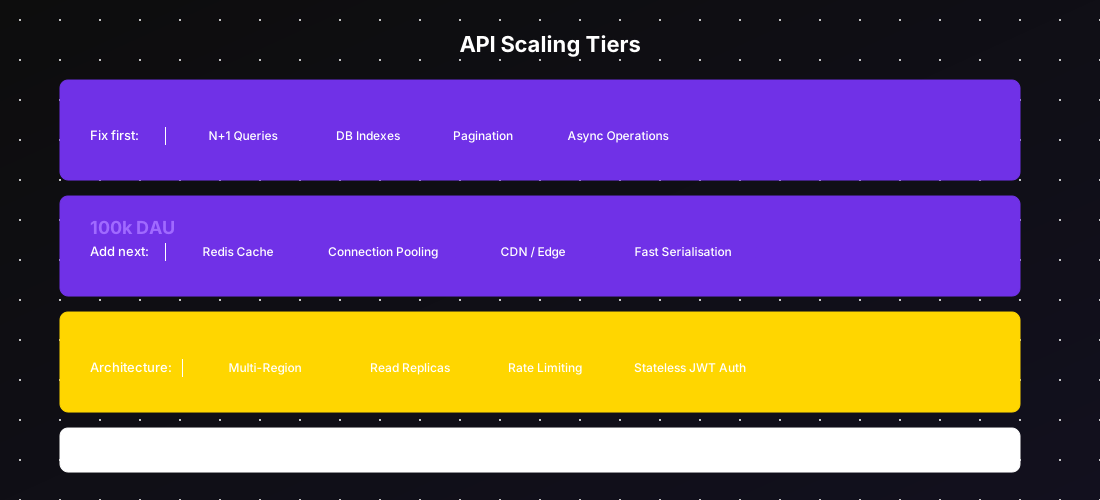
N+1 queries. The classic: you load a list of orders, then for each order you make a separate database call to fetch the customer. One endpoint = hundreds of queries. This is imperceptible at 10 orders. It’s catastrophic at 10,000. Use eager loading, JOIN queries, or a DataLoader pattern.
Missing indexes. A full table scan on a 10-row table is invisible. On a 500,000-row table it can take seconds. Every column used in WHERE, JOIN, or ORDER BY clauses needs an index. EXPLAIN your queries. This is not optional.
No pagination. Endpoints that return unbounded result sets (GET /orders returning all 80,000 orders) will eventually time out, run out of memory, or saturate your network. Cursor-based pagination or keyset pagination is faster and safer than offset pagination at scale.
Synchronous operations that should be async. Sending a confirmation email inline with an API response, resizing an image synchronously during upload, calling a third-party webhook and waiting for a response. These add latency and failure modes to your API surface that have nothing to do with your API’s core function. Queue them.
What Fails at 100,000 Daily Active Users
At 100k DAU, database query design is table stakes — those problems should already be solved. What breaks here is infrastructure.
No caching layer. If your API recalculates the same response for the same inputs on every request, you’re wasting compute and database load that could be eliminated entirely. A Redis or Memcached layer in front of frequently-read, rarely-changed data (product catalogue, user preferences, configuration) can cut database load by 60–80%.
Database connection exhaustion. Each API instance opens connections to the database. At scale, you’ll have multiple API instances, each with their own connection pool. Without a connection pooler (PgBouncer for PostgreSQL is the standard answer), you can saturate the database’s connection limit before you saturate its compute. This is a very fixable problem that causes dramatic failures.
Slow serialisation. If your API serialises large objects to JSON naively — loading entire ORM objects and recursively serialising their relationships — you’re doing far more work than needed. Be explicit about what fields get serialised. Avoid loading rows you don’t need.
No CDN for static assets. Product images, static files, API responses that are genuinely static — these should never touch your application servers. A CDN handles them at the edge for a fraction of the cost and at a fraction of the latency.
What Fails at 1,000,000 Daily Active Users
At 1M DAU, the problems become architectural rather than tactical. Individual service design is mostly fine by this point. What breaks is the system as a whole.
Single-region deployment. One region means one blast radius. A cloud provider incident in us-east-1 takes down your product. More practically, latency for users on the other side of the world is meaningfully worse. Multi-region deployment — active/active or active/passive — is the answer, but it introduces consistency challenges that need deliberate design.
No read replicas. Write-heavy operations go to the primary database. Read operations — which are typically 80%+ of traffic — can go to read replicas. Without replicas, every read is competing with every write on the same database. This is addressable and should be addressed well before 1M DAU.
No rate limiting. At this scale, your API is a target. Abuse, scraping, and client bugs that issue thousands of requests per second will consume capacity intended for legitimate users. Rate limiting per authenticated user, per IP, and per endpoint is not optional. Implement it at the API gateway or load balancer layer, not in application code.
Monolithic auth service. If every API request makes a synchronous call to a central auth service to validate a token, that auth service becomes a single point of failure for the entire system. Stateless JWT validation that can happen locally on each service is the standard answer.
Design Principles That Hold at Every Scale
Stateless services. Don’t store session state in memory on the application server. If you can route the same user to any instance and get the same result, you can scale horizontally without coordination.
Idempotent writes. A POST that creates an order should be safe to retry. Use idempotency keys. If the network drops between a client and your API, the client should be able to retry without fear of creating duplicate data.
Explicit API contracts with versioning. Version your API (/v1/, /v2/) and treat breaking changes as intentional releases. Clients that haven’t upgraded shouldn’t break.
Async where latency isn’t required. Anything that doesn’t need to happen before you respond to the client, shouldn’t. Notifications, analytics events, side effects — all of these belong in a queue.
Caching Strategy
Caching is the highest-leverage optimisation in API engineering, and the most frequently misused.
What to cache: data that is read frequently, changes infrequently, and is expensive to compute or query. Product catalogues, user profile data, configuration, aggregated metrics.
Where to cache: an in-process cache (fastest, but per-instance and not shared) for very hot, stable data; a distributed cache like Redis (slightly slower, shared across all instances) for data that needs consistency; a CDN for full response caching of public, non-authenticated endpoints.
Cache invalidation is the hard part. The safest patterns: set short TTLs on data that changes (30–300 seconds), use event-driven invalidation when a write happens (publish an event, invalidate the cache key), and never cache data where stale values cause correctness problems.
Practical Scaling Checklist
| Area | 10k DAU | 100k DAU | 1M DAU |
|---|---|---|---|
| Query optimisation (indexes, N+1) | Required | Required | Required |
| Pagination on all list endpoints | Required | Required | Required |
| Async for non-critical operations | Required | Required | Required |
| Caching layer (Redis/Memcached) | Helpful | Required | Required |
| Connection pooler (PgBouncer) | Helpful | Required | Required |
| CDN for static assets | Helpful | Required | Required |
| Read replicas | Optional | Helpful | Required |
| Rate limiting | Optional | Required | Required |
| Multi-region deployment | Optional | Optional | Required |
| Stateless JWT auth | Recommended | Required | Required |
Building a backend and want to get the architecture right before you hit scale? Write to us at hello@cimpleo.com — we’ll review your current design and tell you where the risk is.