inBiot MICA: ESP32 Firmware & Companion App
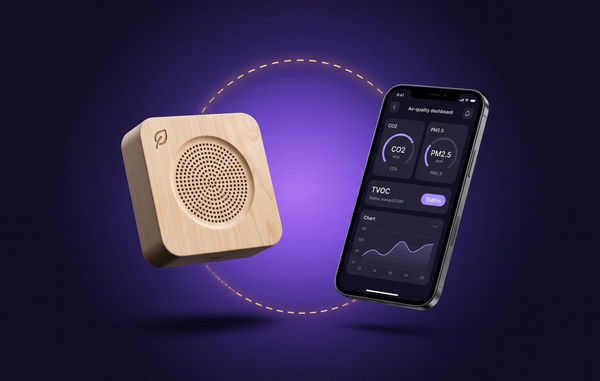
inBiot is a Spanish air-quality technology company. Its flagship product, MICA, is a RESET Air-accredited indoor air quality monitor tracking CO₂, particulate matter (PM1.0–PM10), TVOCs, formaldehyde, temperature, and humidity — used in offices and buildings pursuing WELL, LEED, and BREEAM certification. MICA ships data to the cloud over WiFi, GSM, or LoRaWAN. Before any of that happens, though, a brand-new device with no network connection at all has to be handed a WiFi network to join — and that handoff is where most of this project lives.
Our task
CimpleO owned both sides of that handoff: the ESP32 firmware running on the MICA device itself, and the React Native companion app — built to a design inBiot’s own team had already put together in Figma — that talks to it. The two had to agree on a protocol, work identically on iOS and Android, and stay reliable enough that a customer could set up a device without calling support.
Device firmware
v1: WiFi access point and HTTP
The first working version had MICA’s ESP32 microcontroller (a DOIT ESP32 dev board) power on into its own WiFi access point, with the app connecting to that access point directly and exchanging setup data with the device’s local web server over HTTP. It worked, but WiFi-based provisioning turned out to be exactly as flaky as WiFi discovery usually is on mobile: the app would sometimes find and connect to the device’s access point quickly, and sometimes not find it at all, on both Android and iOS.
Moving to Bluetooth Low Energy
We rebuilt the pairing step around Bluetooth Low Energy instead, using NimBLE-Arduino for the ESP32 side — chosen specifically for its track record on iOS, which is normally the harder platform to get BLE peripherals working against reliably. The firmware advertises under a fixed BLE service UUID and only spins up when it has a reason to: either no WiFi credentials are stored yet, or the last connection attempt failed.
The BLE command protocol
The app and firmware speak a small JSON command set over a single BLE characteristic:
wifi-scan— device scans and returns nearby networkswifi-credentials— app hands over the chosen SSID and password, plus optional static IP, gateway, and subnet mask for networks that need themconfiguration— app pushes ventilation type, indicator-light behavior, and Modbus RTU parameterssensor-id— device reports its serial number back to the appfinish— device commits the connection attempt and reports success or failure
Each command gets a JSON response over the same characteristic via BLE notify. Earlier versions tagged every message with an id field for request/response matching; since every exchange is already synchronous over a single connection, the firmware team dropped it — one field, two directions, removed from every command at once, because it wasn’t buying anything.
Reconnecting without the app
The pairing flow above only runs when it has to. On every boot, the firmware first tries connecting with whatever WiFi credentials are already stored on the device, and only falls back to advertising over BLE if that direct connection fails or no credentials exist yet. A returning customer’s MICA reconnects on its own after a power cut or a router reboot — the phone only re-enters the picture if something about the network actually changed.
Configuring the device, not just the network
The same BLE configuration command that sets up WiFi also carries settings that have nothing to do with getting online: ventilation type, the behavior of MICA’s status indicator light, and — for buildings integrating MICA into a building management system — Modbus RTU parameters (address, baud rate, parity). All of it lives behind one command, decoded firmware-side into the device’s stored settings.
Physical reset
A dedicated GPIO pin on the board, wired to a pull-up, gives the firmware a hardware-level escape hatch: holding it low clears the stored WiFi credentials and restarts the device straight into BLE pairing mode. It’s the answer to the support case that always comes up eventually — a customer replaces their router and needs to re-pair a device that’s otherwise working fine.
Companion app
Multi-device pairing
The app scans for MICA units by the same fixed BLE service UUID the firmware advertises under. In an office with several units installed, more than one shows up in the same scan — so the app surfaces them by name and lets the customer pick the right one before going any further into the pairing flow.
Localization and support
The app ships in English and Spanish. Its help, legal, and privacy pages don’t duplicate content natively — they open inBiot’s own site (inbiot.es) directly in an in-app WebView, so there’s one source of truth for that content instead of two. A configuration history screen keeps track of every device a customer has already set up.
Deployment
Beyond development, we handled getting the app through App Store and Google Play review — including the follow-up review cycles that come with a first submission getting bounced back.
Results
Setting up an air quality monitor now takes a phone and a few taps instead of a manual network-configuration step, works the same way on iPhone and Android, and — for every setup after the first — doesn’t need the phone at all. Moving the pairing step from WiFi to BLE removed the single least reliable part of getting a new MICA device online; the boot-time reconnect logic means it stays online without repeating that step every time the network hiccups.
Engineering at a glance
- Scale. About 137 engineering hours, 2 engineers, 2021-12 to 2022-03.
- Firmware cadence. 15 commits and six firmware versions (1.1 to 1.6) between 2022-01-24 and 2022-02-09, with SAST enabled in the GitLab pipeline.
- BLE stack. NimBLE-Arduino on the ESP32 with one fixed service UUID and one read and one write characteristic. The app uses react-native-ble-plx 2.
- App stack. 171 commits from 2021-12-22 to 2022-03-09 on React Native 0.67 with TypeScript, MobX 6, React Navigation 6 and WebView for help and legal pages.
- Provisioning rules. Boot tries stored WiFi credentials first and advertises over BLE only on failure. A pull-up GPIO (pin 13) held low erases credentials and restarts into pairing.
- Late changes. Support for unencrypted WiFi networks (2022-02), a Bluetooth state indicator on the intro screen, and Hermes disabled on iOS during an iOS build fix.
Need BLE provisioning or a companion app for your device? Our IoT engineering team ships firmware and mobile apps together. Tell us about your project.