The Rise of Mobile Project Management Systems
Reading time: 4 minutes
Last modified:
The previous article about ZeroDark described the project development process: tasks, technical solutions and screen design. Work on the project continues and we want to tell you about the Mobile version of ZeroDark.
Feature
Shipyard managers and workers can collaborate on tasks and track work from their mobile devices. Workers can update task status and answer comments easily from a phone, they won’t need to be in the office workplace to access the web version.
All actions in the app are synchronized with the ZeroDark web, Kanban board.
Our task
The client wanted to make an app for Android devices only with just necessary functions: login - same as ZeroDark web, tasks list - changing work status, tasks manager feedback and push notifications.
Reason: simpler access to production tasks for workers while out of the office, in production hangar. Project management system - all in your pocket.
Solutions
To implement a mobile application, we had to update the backend to support a separate application. The web and the application share one common server-side. Frontend - the graphical part is implemented using React Native, Redux-Saga and TypeScript.
Screen list
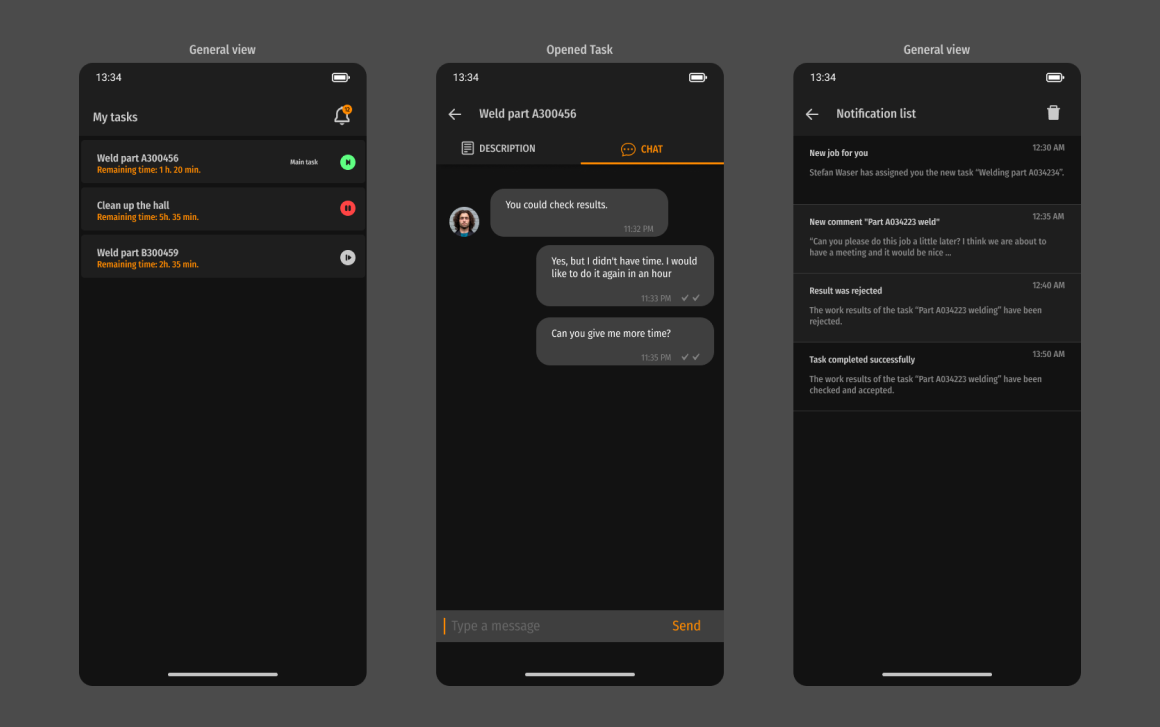
The main screens of the app are: Task list view, worker-manager chat and notifications history.
Task list is the place where workers check all production tasks assigned to them, can enter a task to start/pause the work. Tasks have active status icons and time for completion.
Chat is created for a specific task when a manager or worker first commented on it. We used react-native-gifted-chat UI here.
Notifications - the last screen has all the events workers get as mobile app push notifications. If they missed something, they can check the event again on this screen. Workers can dismiss all notifications, click on one - it will take them to the event page. We used OneSignal API to get tasks, events and comments from the backend and show related push notifications.
Built from a real spec, tested against real regressions
The app was built screen-by-screen from a Figma spec covering login, task list, task detail, and chat, and we moved authentication to session-based multi-login so a worker can stay signed into the web app and the phone app at the same time without getting logged out of either.
Because the web and mobile app share one backend, our QA pass focused on the seams between them — the places a shortcut would only show up once both clients were running side by side. A few examples that shaped the final release:
- Cross-client task state. Starting a task in the web app while another was already running in the mobile app could leave the “start task” button stuck disabled — we traced it to how task state was synced across clients and fixed the underlying race condition, not just the button.
- Date localization. Task dates were rendering in the wrong day/month order for the shipyard’s locale — caught by testing with the device set to each target region rather than assuming a single date format everywhere.
- Region-by-region QA. We ran full passes with the device locale set to each market the app ships in, which is what surfaced the date-format issue and a text-layout bug in the login screen that only appeared under the German locale.
- Notification state. Read and unread push notifications were swapped in color in the notification history screen — a small thing, but exactly the kind of bug that erodes trust in a “did my manager see this” indicator.
None of this shows up in a feature list, but it’s why the app held up once real shipyard workers started using it on the production floor instead of a QA device.
Results
We have created a mobile task management app for tracking employee tasks and the status of their work. With our solution, all internal processes at the shipyard are displayed in a single mobile application